
How to log in to TPOWER
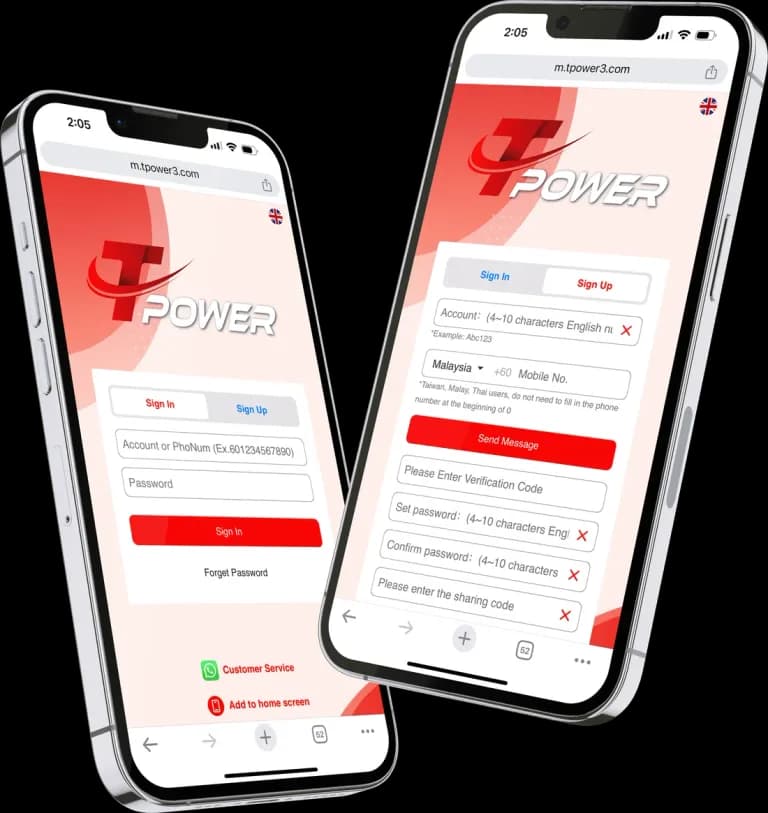
- Tap Login on this page or in the menu at the top of any page. It opens the TPOWER sign-in page on the game platform.
- Enter your TPOWER ID and the password you created when you registered. Type them exactly as you set them up, and watch for capital letters your keyboard adds on its own or a space added by autocorrect.
- Confirm to sign in. You land in your account, with the games and the cashier one tap away.
Logging in on the app
If you have installed the TPOWER app, open it from your home screen and sign in with the same ID and password. One account works everywhere: in the app, in your phone's browser and on a computer.
Saving your password
Your browser may offer to remember your password. Only accept on a phone or computer that you alone use, with a screen lock switched on. On a shared or public device, never save it, and log out when you finish.
Forgot your password or ID?
Stop guessing and tap the support button on any page to reach live support. Tell our support team whether it is your password, your ID or both that you cannot remember, and they will explain how to get you back into your account.
Our support team may ask for some details to confirm the account is yours before making any change. That check protects you: it stops anyone else getting into your account by claiming to be you. For other account questions, see our help centre.
Keep your account secure
- Never share your password or PIN with anyone — not a friend, not an agent, and not someone who contacts you out of the blue.
- Use a password you use nowhere else. If you think someone else knows it, contact live support straight away.
- Log in only through the Login button on this site or through the official TPOWER app. Links sent to you in messages can lead to copy sites built to collect passwords.
- Lock your phone with a PIN, pattern or fingerprint, so a lost phone does not mean an open account.
- Log out on any device you share with someone else.
Common login problems
Your ID or password is not accepted
Check the ID for typing mistakes and make sure Caps Lock is off. If you pasted the password from a note, look for an extra space at the start or end. If it still fails, contact live support rather than trying again and again.
The sign-in page will not load
Check your internet connection, or switch between Wi-Fi and mobile data. Close and reopen the browser, or clear its cache. If you use the app, make sure you have the current version from our download page.
You were signed out
For your security, you may be signed out after a period without activity. Simply log in again with the same details.
Still stuck?
Tap the support button and describe what you see on the screen. A screenshot of any message helps our team understand the problem.
TPOWER is for adults aged 18 and over. If you notice you are logging in more often than you planned, our responsible gaming page explains limits and breaks.